
See J!UM in Action
See how J!UM is installed, configured and used in everyday Joomla maintenance workflows.
The video walks you step by step through the key features – from installation and project connection to the centralized management of components, modules, plugins and templates.
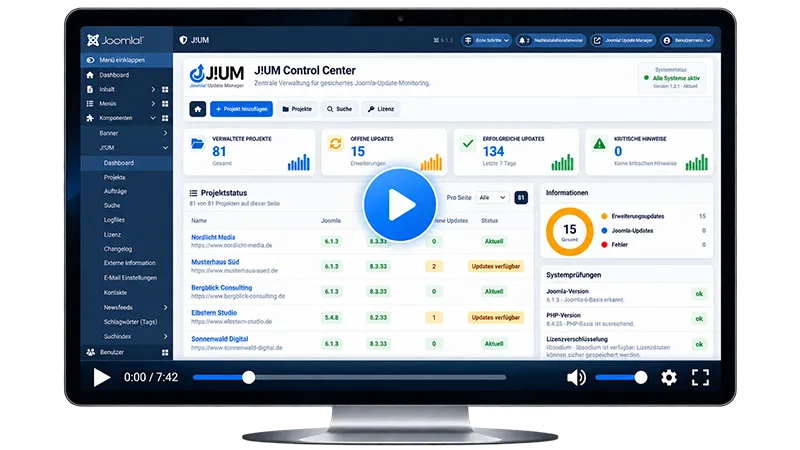
Learn J!UM Step by Step
The video provides a complete overview of J!UM and shows the practical workflow from initial setup to day-to-day work with multiple Joomla websites.
You will learn how to connect projects, check extensions, manage updates, integrate backups and monitor maintenance jobs in a traceable way.
Note: Joomla Core updates are not part of this workflow. They continue to be handled directly by Joomla or through the configured automatic Core update process.
What You Will Learn in This Video
1. Installation
Learn how to install J!UM and prepare the central Control Center for first use.
Get J!UM up and running quickly and in a controlled way. The video covers installation, basic configuration and the most important first steps.
2. Configuration
Learn the most important settings and how to configure J!UM for your own environment.
See which settings are relevant for secure and reliable operation and how to adapt J!UM to your environment.
3. Set Up Projects
See how Joomla websites are connected through the J!UM Connector and how central project data is stored.
Learn how to connect, organize and manage Joomla websites through the central Control Center.
4. Updates & Backups
Check and update components, modules, plugins and templates centrally across multiple Joomla websites.
See how extension updates are checked and installed, and how optional Akeeba backups are integrated into the maintenance workflow.
Why Watch This Video?
J!UM was designed to make recurring maintenance across multiple Joomla websites clear, traceable and efficient.
The video does not just show individual features – it demonstrates the complete practical workflow, from the first project to regular checks and extension updates.
Save Time
Manage multiple Joomla websites centrally instead of logging in to different administrator areas for every maintenance step.
Work More Systematically
Get to Know J!UM in Practice
Joomla Handles the Core – J!UM Handles the Extensions
Joomla provides its own mechanisms for Core updates and automatic Core updates.
J!UM intentionally does not replace these functions. Instead, J!UM focuses on the centralized management of components, modules, plugins and templates, as well as complementary maintenance, backup, monitoring and security information.
See J!UM in a Real-World Workflow
In the video, you will see how to connect projects, check extension updates, integrate backups and monitor jobs.
